

Writing, publishing, and promoting spin the author’s flywheel, building momentum. Checkout self-publishing at Draft2Digital.
By: Grant P. Ferguson
Last Updated: December 18, 2024
Recommendation
While putting the final touches on the Trellis Method update, I compared Draft2Digital.com* (D2D) to BookBaby.com. Both companies offer a fantastic array of services to independent writers who want to self-publish their books. What surprised me was the dramatic difference in pricing for a standard sized paperback suitable for most works of fiction. I highly recommend you evaluate and compare carefully the pricing of both companies before you self-publish. In my comparison, Draft2Digital provided authors with a quality product at the lowest cost, empowering writers to validate their book with a proof-copy at a bargain price.
*If you buy through the link above, my affiliate relationship with D2D won’t cost you one penny more, and I only recommend tools I use.
What Is Draft2Digital?
Writing, publishing, and promoting spin the author’s flywheel, building momentum.
Draft2Digital tackles the labor-intensive task of publishing and distributing wide, making your book available to multiple retailers around the world.
Instead wasting time going directly to multiple retailers, send your book to D2D and let them handle the publishing and distribution of both print and digital books.
Draft2Digital Benefits
As compared to you doing all the work, D2D offers several major benefits.
- Saves time because you upload once and D2D takes care of the rest.
- Shortens your learning curve with easy-to-use templates.
- Gives writers a way to go wide with no out-of-pocket expense.
- Offers both ebook and print-on-demand.
- Tracks sales across multi-retailers to simplify bookkeeping and tax filing.
- Helps you promote your book through Books2Read.
Where Does Draft2Digital Publish?
D2D gives you the option to publish books to several retailers. For example:
- Amazon
- Apple Books
- Barnes & Noble
- Kobo (including Kobo Plus)
- Smashwords Store
- Tolino
- OverDrive
- cloudLibrary
- Everand
- Baker & Taylor
- Hoopla
- Vivlio
- BorrowBox
- Odilo
- Palace Marketplace
- Gardners
You choose which retailers through an easy opt-in or opt-out checklist, and when D2D adds a new store, you keep control over whether to publish through that outlet.
Pricing and Print Options
Pricing
D2D provides the tools to cost and price your book, including offering ebooks for free to every store except Amazon.
For Amazon, D2D will submit your free book at $0.99 (99-cents USD). Amazon may choose to price-match to bring prices in line with other vendors at their discretion.
Amazon has file size limitations. Books priced at or below $0.99 may upload a file that is up to 3MB, those priced between $1.00 and $1.99 may upload a file that is 10MB or less, and if you upload a file that is 10MB or greater, you must price at $2.99 or more.
Also, you can set the price in other currencies by clicking the D2D’s button “Manage Territorial Prices” under the Book Price field.
Enjoy the Best of Both Worlds
You can still publish direct to Amazon through KDP and also use D2D to distribute wide, making your book available at retail stores around the world. This means you can enjoy using all of Amazon’s features and benefits (e.g., Author Central, formatted sales blurbs, and much more) while increasing your global reach through D2D.
D2D cannot offer print books for free as there is a cost for the materials to produce a physical book. D2D provides a handy Print Copy Calculator so you can find your lowest possible sales price. The trim-size options (e.g., 5” x 8”, 5.25” x 8.5”, 5.5” x 8.5”, 6” x9”, 7.5” x 9.25”, and 8.5” x 11”) influence your cost.
Taxes, Payments, and Reports
Taxes
The initial tax setup is straightforward. You fill out the tax form and choose a payment method.
Payments
You have several payment options.
- PayPal ($0 USD minimum)
- Direct deposit ($0 USD minimum)
- International Direct Deposit ($20 USD minimum)
- Payoneer ($20 USD minimum)
- Check ($100 USD minimum)
Draft2Digital delivers payments once a month, after meeting the threshold (shown in parentheses above).
Reports
You can download a detailed sales report. As an example, here’s the sales information for a book priced on one retailer at $4.99:
- Distributor: Apple Books
- Units Sold: 1
- Units Returned: 0
- Net Unit Sales: 1
- List Price Per Unit: $4.99 USD
- Offer Price Per Unit: $4.99
- Royalty Percent: 70%
- Sales Channel Fee/Taxes Per Unit: $0.00
- Sales Channel Revenue Per Unit: $3.50
- Extended Sales Channel Revenue: $3.50
- Sales Channel Share: $1.49
- D2D Share: $0.52
- Publisher Share (i.e., the author’s net before taxes): $2.98
Centralized Reporting for Multiple Retailers
For a $4.99 sale, it’s a joy to get $2.98 in your checking account.
Book Cover Requirements
D2D accepts the most common image formats and they automatically handle resizing as needed for the requirements of each retailer. For example, you can use a JPEG at 1600×2400 pixels or even higher resolution.
Also, for print, Draft2Digital will auto-generate a wraparound cover based on your ebook art (aka front cover art) and they provide some basic customization options like spine text and back cover text editing.
Ebook Cover Example

Print Cover Example

If you prefer having a professional make your print cover, download D2D’s print cover template, custom sized to fit your trim and paper choices. Once you’ve got your print cover back from your professional, upload the print wraparound book cover and Draft2Digital will place your barcode for you.
Book and Author Presentation
To see how D2D helps writers by showing their work and making their books available across multiple channels, follow these Universal Book Link (i.e., D2D’s “UBL”).
Book Retailers Example
https://books2read.com/finding-peace-devotional
Book Description & Author Bio Example
https://books2read.com/b/finding-peace-devotional
Draft2Digital Supplies Free ISBN
Unless you supply your own ISBN, Draft2Digital automatically assigns a free ISBN to any book published through their system.
The ISBN recording agency denotes D2D as the “vendor of record” on their website for any ISBN D2D purchases, but that label does not give them any rights to your work, nor will it show publicly.
All the digital retailers will continue to show the publisher’s name you choose (e.g., Tame Your Book Media). If you leave the publisher’s name blank, your author’s name will show.
How Does Draft2Digital Work?
Free Sign Up
Sign up is fast and no credit card is required.

New Book
Once you’ve established your account, you’ll begin the process to add a new book.

The steps to creating a new book project are straightforward. D2D will guide you with prompts and help screens. Before you publish, you can edit all your responses, including changes to your cover art and manuscript file.

Here’s an example.
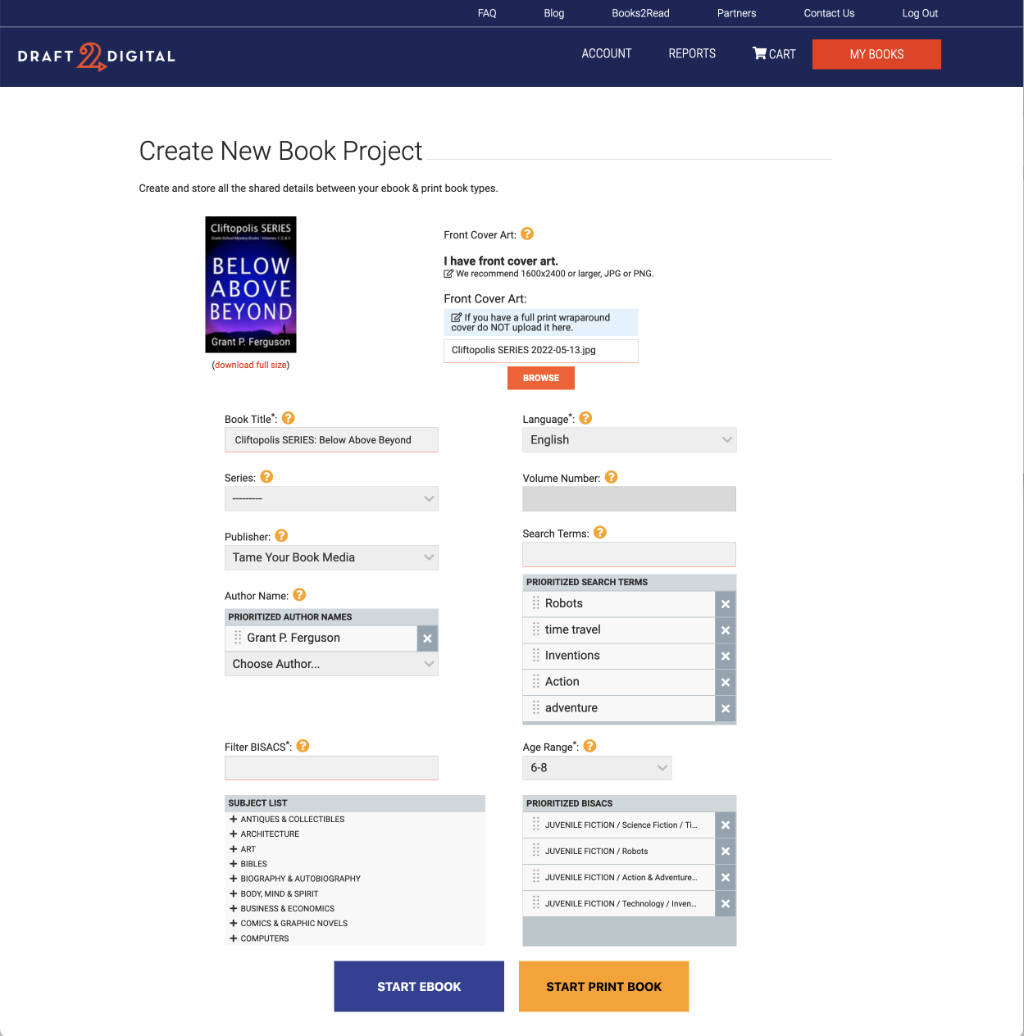
You’ll continue to add details based on D2D’s on-screen prompts.

If interrupted by life’s events, no problem! You can always pick up where you left off even if that takes days or weeks before you’re ready to publish.
You decide whether to have D2D insert essential information (e.g., the Title Page and Copyright). In this next example, the essential information was already in my uploaded manuscript file (i.e., a Word docx file).

Now the fun begins as you preview the contents of your uploaded file and experiment with the D2D page decorations. I chose the Classy Mystery Style, which inserted art around the chapter, and also a small magnifying glass between each of the scene breaks.

To preview your book, download either EPUB or PDF file. I choose the EPUB.

Use Amazon’s Kindle Previewer to check the EPUB file’s quality and layout. The free app is available for both Windows and Apple computers. Visit Amazon to download the app. Here’s a screenshot of my EPUB file loaded into Kindle Previewer 3.

Note: Editing a book is an iterative process that requires updating your manuscript file, uploading it to D2D, downloading the updated EPUB file, and reviewing the book in your favorite previewer app. You soon get practiced at repeating the steps until you achieve the desired look and quality.
Conclusion
I’ve given you a brief overview of signing up for Draft2Digital, inputting your essential information, uploading your manuscript file, and checking for the desired quality.
Once you’re ready to publish, you’ll set the price and go through the final quality checklist.
High-quality digital and print books depend on excellent input. Plan time to check input and layout issues before you publish.
For a $4.99 priced ebook, you’ll share $.52 of the gross revenue with D2D. I believe that’s a fair trade for saving time and not having to learn the processes and policies of several retailers.
Leave a Reply
Which of the self-publishing vendors have you used? Please share your self-publishing experiences!


Leave a Reply to Jacqui MurrayCancel reply